go-ls
A complete ls command-line replacement written in Go — everything the original does, plus icons and extra features.
go-ls
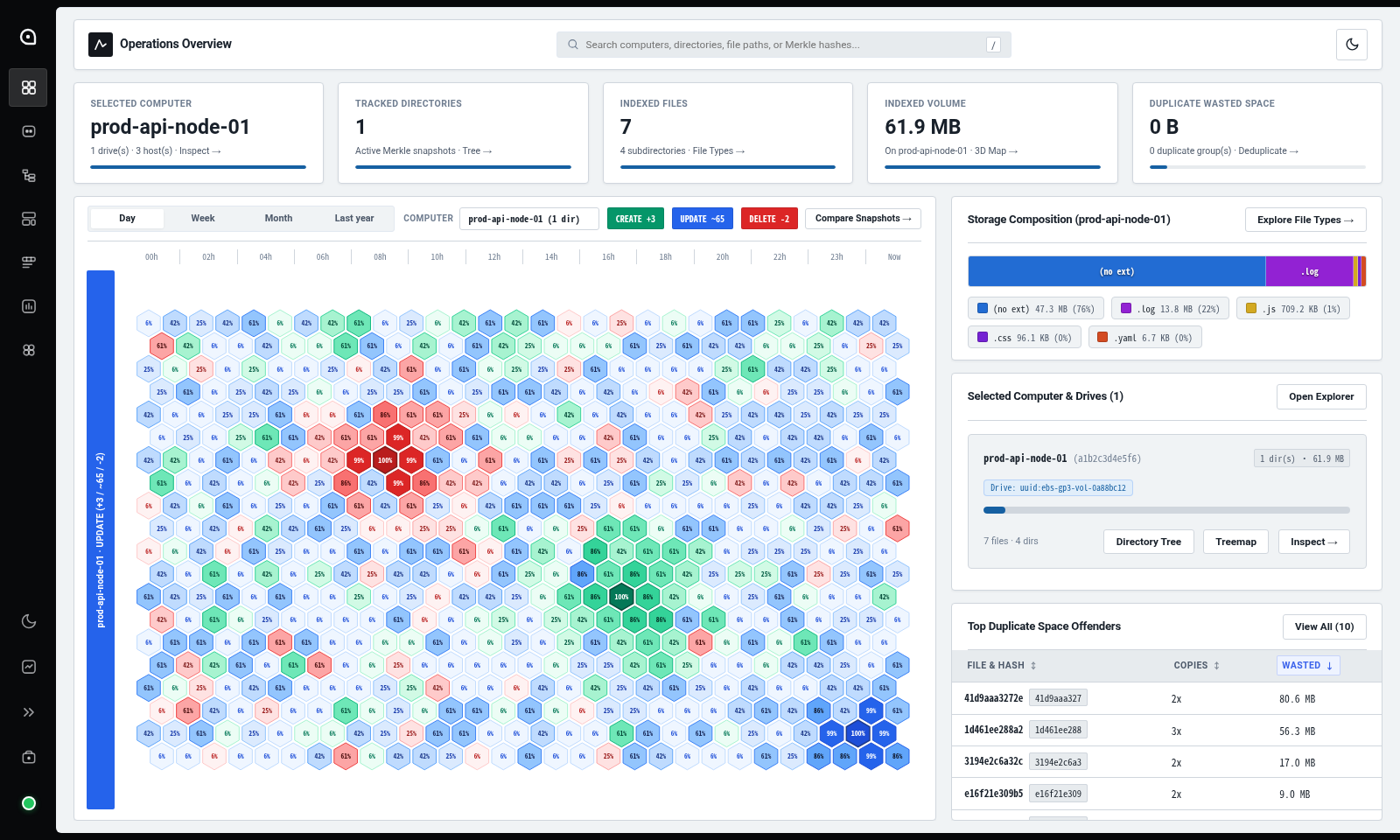
A high-performance client-server directory scanning, Merkle-hashing, backup comparison, and duplicate detection platform written in Go with an integrated Next.js web console served directly by the Go server.
go-ls combines a fast concurrent filesystem scanner (go-ls / go-ls-client) with a centralized HTTP, Next.js Web UI, and PostgreSQL backend (go-ls-server, deployable via Podman Compose or Docker Compose). Clients can scan directories locally or push file and folder checksums to the server to browse snapshots in the web UI, compare directories across machines, validate backups, and detect duplicate files.
Key Features
- Client-Server Architecture + Next.js Web UI:
- Client (
go-ls scan): Walks local directories concurrently, computes file and folder Merkle hashes, and uploads snapshots to the server. - Server (
go-ls serve/cmd/server): Persists scan snapshots in PostgreSQL (or in-memory for standalone testing), serves the Next.js Web Console athttp://localhost:8080/(with--devand--ui-proxysupport for live HMR development), and exposes a REST API (/api/v1/*) for querying, diffing, and deduplicating files across scans. - 7-View Web Console (
web/): Features an Operations Overview Dashboard, Computers & Scans, Directory Tree (WinDirStat hierarchy), 3D Cushion Map (isometric hardware telemetry modules), File Types, Snapshot Diff, and Duplicates views.
- Client (
- Podman Compose & Docker Compose Ready:
- Includes both
podman-compose.yml/podman-compose.dev.yml(withContainerfileand rootless SELinux volume labels:Z) anddocker-compose.yml/docker-compose.dev.yml(withDockerfile) launching PostgreSQL 16 +go-ls-server+ compiled or hot-reloaded Next.js UI.
- Includes both
- Server-Backed Operations (CLI & Web UI):
- Scan Storage & Explorer (
go-ls scan --server ...): Store complete filesystem inventories with host, root path, tags, and Merkle root hashes, and explore entries in the browser. - Cross-Machine Diffs (
go-ls diff <base-id> <target-id>): Compare any two stored scans on the server to identify added (+), deleted (-), and modified (~) files and directories. - Scan History (
go-ls scans): List all stored scans or inspect every entry in a specific snapshot. - Duplicate Detection (
go-ls duplicates): Find duplicate files by content hash and size within a single scan or across all stored scans, sorted by wasted bytes.
- Scan Storage & Explorer (
- Standalone Local Modes: Works without a server too (
default,-l/--long,--compareCSV,--jsonNDJSON, and--livecontinuous filesystem monitoring).
Deploying the Server (Podman Compose / Docker Compose)
Using Podman Compose (Production vs. Hot-Reload Dev)
# Production stack (minimal compiled Alpine image + PostgreSQL 16)
podman-compose -f podman-compose.yml up -d --build
podman-compose -f podman-compose.yml down

# Development stack with live Go + Next.js HMR hot-reload (bind-mounted workspace)
podman-compose -f podman-compose.dev.yml up
podman-compose -f podman-compose.dev.yml down
Using Docker Compose (Production vs. Hot-Reload Dev)
# Production stack
docker compose -f docker-compose.yml up -d --build
docker compose -f docker-compose.yml down

# Development stack with live Go + Next.js HMR hot-reload
docker compose -f docker-compose.dev.yml up
docker compose -f docker-compose.dev.yml down
Once running, open http://localhost:8080 in your browser to access the Next.js Web Console, or verify the API healthcheck:
curl http://localhost:8080/healthz
# {"status":"ok"}
Running Without Installing (go run)
You can build the Next.js frontend and run any client or server command directly from source:
# 1. (Optional) Build the Next.js static frontend so the local Go server serves it on /
cd web && npm install && npm run build && cd ..

# 2. Start a standalone local server (or use --dev for live Go + Next.js HMR hot-reloading)
go run . serve --listen=:8080
go run . serve --dev --listen=:8080

# 3. Scan a directory and upload it to the server
go run . scan -R --server=http://localhost:8080 --scan-id=snap-1 --tag=before ./pkg

# 4. List all stored scans on the server
go run . scans --server=http://localhost:8080

# 5. Inspect a specific stored scan
go run . scans snap-1 --server=http://localhost:8080

# 6. Compare two scans stored on the server
go run . diff snap-1 snap-2 --server=http://localhost:8080

# 7. Find duplicate files across stored scans
go run . duplicates --server=http://localhost:8080

# 8. Run a local-only scan (no server required)
go run . -l --hash

# 9. Monitor a directory live for changes (and optionally stream snapshots to the server)
go run . -R --live ./pkg
go run . -R --live --server=http://localhost:8080 --tag=live ./pkg
Global Installation & Building Binaries
You can install go-ls, go-ls-server, go-ls-client, and the compiled Next.js Web UI bundle globally so go-ls is available from any directory in your terminal.
Option 1: Automated Global Install (make install / ./scripts/install.sh)
The installer compiles the Go binaries and static Next.js frontend (web/out), installing the binaries onto your PATH (~/.local/bin or $(go env GOPATH)/bin for user installs, or /usr/local/bin for system-wide installs) and placing the Web UI bundle into ~/.local/share/go-ls/web (or /usr/local/share/go-ls/web):
# Install globally for the current user (no sudo required)
make install
# or directly:
./scripts/install.sh

# Install system-wide to /usr/local/bin and /usr/local/share/go-ls/web (uses sudo if needed)
make install-system
# or directly:
./scripts/install.sh --system

# Custom prefix or Go-binaries-only install
./scripts/install.sh --prefix=/opt/go-ls
./scripts/install.sh --skip-web

# Verify global installation from any directory
go-ls --version

# Uninstall globally installed binaries and Web UI assets
make uninstall
# or:
./scripts/install.sh --uninstall
Option 2: Go Toolchain Install (go install)
To install the CLI binaries directly into $(go env GOBIN) or $(go env GOPATH)/bin (typically ~/go/bin):
# From a local clone (installs go-ls, server, and client)
make install-go
# or:
go install . ./cmd/server ./cmd/client

# Or install the unified go-ls CLI directly from GitHub
go install github.com/vitorecomp/go-ls@latest
Option 3: Local Binary Build (make build / go build)
# Build Next.js frontend (web/out) and all Go binaries into the repository root
make build

# Or build individual Go binaries manually
go build -o go-ls .
go build -o go-ls-server ./cmd/server
go build -o go-ls-client ./cmd/client
CLI Subcommands Overview
| Subcommand | Description |
|---|---|
go-ls [scan] [<path>...] | (Default) Scan local files/directories, print the resumable Scan ID first, compute file & folder hashes, and stream entries in incremental batches (--batch-size, --resume=<id>) to --server. |
go-ls scans [<scan-id>] | List all scans stored on the server, or inspect entries of <scan-id>. |
go-ls diff <base> <target> | Compare two stored scans on the server and report added, deleted, and modified entries. |
go-ls duplicates [<scan-id>] | Find duplicate files by hash and size within <scan-id> or across all stored scans. |
go-ls serve | Start the go-ls HTTP REST API & Next.js UI server (--listen=:8080, --db-url=..., --ui-dir=./web/out, --dev, --ui-proxy=...). |
go-ls --version / -v / version | Print the go-ls version (go-ls v0.2.0) and exit. |
Documentation
Detailed documentation is available in the documents/ directory:
- Documentation Index (
documents/README.md): Overview of all project documentation. - Architecture Guide (
documents/architecture.md): Client-server topology, Next.js static hosting, REST API endpoints, and concurrent Merkle hashing. - Data Model & Storage (
documents/data-model.md): Domain models (Computer,ScanRecord,ScanHistoryEntry), ER diagram, PostgreSQL schema, and JSON API payloads. - Design Decisions (
documents/design.md): Merkle directory hashing, unprivileged hard drive UUID detection, in-place snapshot versioning, and concurrency design. - Roadmap & TODO (
documents/todo.md): Completed milestones and upcoming feature backlog. - Usage & Recipes (
documents/usage.md): Step-by-step Podman Compose / Docker Compose setup, Web UI overview,--livemonitoring, and CLI flags. - Contributing Guide (
documents/contributing.md): Development workflow, frontend & backend testing instructions, and coding conventions. - AI Agent Instructions (
AGENTS.md): Repository guide for AI coding agents.
License
This project is licensed under the MIT License .